Accounting
From invoices to books. Keep everyday accounting connected.
Connect quotes, invoices, payment records and reports, alongside receipts, stock and Hong Kong payslips.
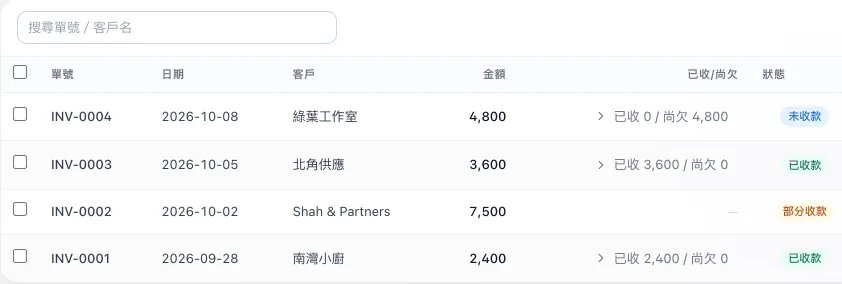
01 Invoices and payments
From quote to payment, keep the record.
Turn quotes into invoices in one step and record payments. Keep a record of credit notes or voids. Customers can view and download invoices through secure, time-limited links.
Related capabilities
Invoicing
Create invoices, record payments and produce PDFs.
Quotes
Create a quote and turn it into an invoice in one step.
Credit notes and voids
Issue a credit note or void an invoice, with the full record kept.
Invoice sharing link
Share an invoice PDF with customers through a secure, time-limited link.
02 Invoice from a conversation
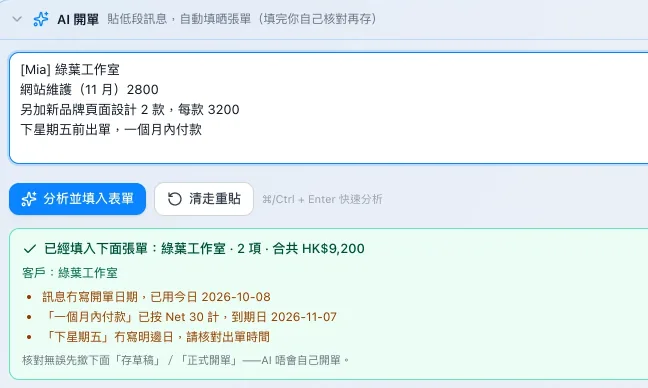
Start an invoice from a customer message.
Paste a customer message for AI assistance with an invoice draft; a team member confirms before saving. Create invoices beside WhatsApp conversations, with customer details pre-filled.
Related capabilities
AI invoice drafting
Paste a customer message and AI fills in a draft invoice for a team member to confirm.
Invoice from a conversation
Create an invoice beside a WhatsApp conversation, with customer details pre-filled.
03 Recurring invoices
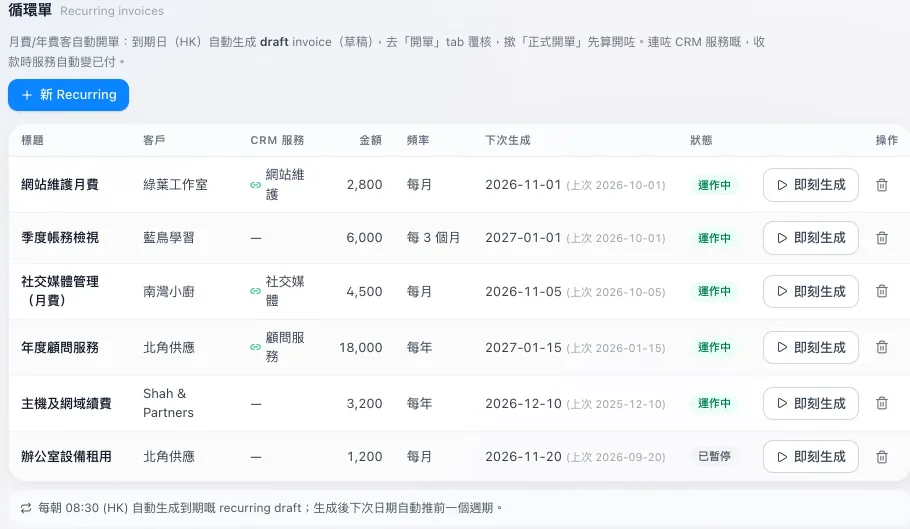
Review recurring drafts. Keep customer statements clear.
Recurring invoices are drafted automatically and issued only after review. Produce a statement for each customer to review their transactions.
Related capabilities
Recurring invoices
Recurring invoices are drafted automatically and issued after review.
Customer statements
Produce a statement for each customer.
04 Receipts
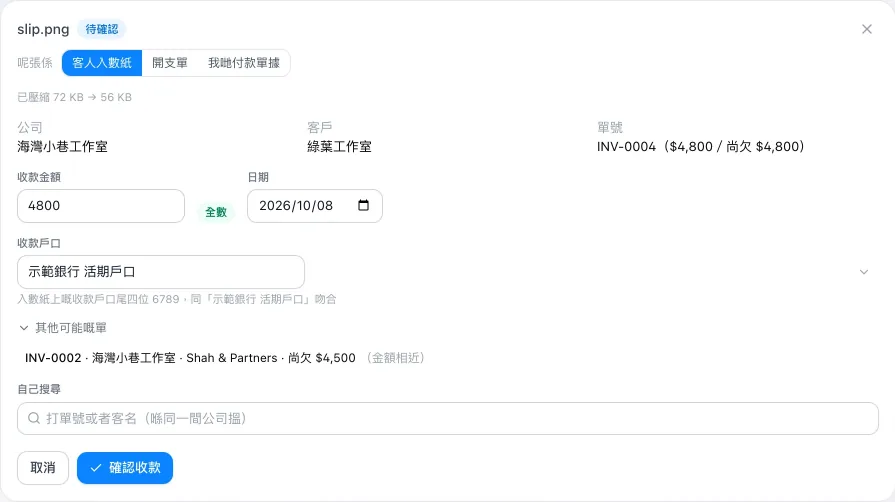
Read the receipt. Confirm before posting.
Upload receipts and deposit slips. AI assists with reading the contents and suggesting matches; a team member confirms before posting.
Related capabilities
Receipts and deposit slips
Upload receipts and deposit slips; AI reads them and suggests a match, and a team member confirms before posting.
05 Purchasing and stock
Record purchases. Track stock as you invoice.
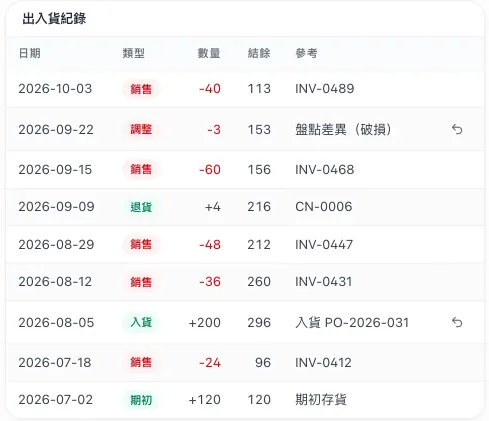
Keep purchase orders, supplier expenses and payment records. Track stock movements by product code, with stock deducted automatically when an invoice is created.
Related capabilities
Purchasing and supplier payments
Purchase orders, supplier expenses and payment records.
Inventory
Item codes and stock movement records, with stock deducted automatically on invoicing.
06 Books and reports
Keep the books. See how business is doing.
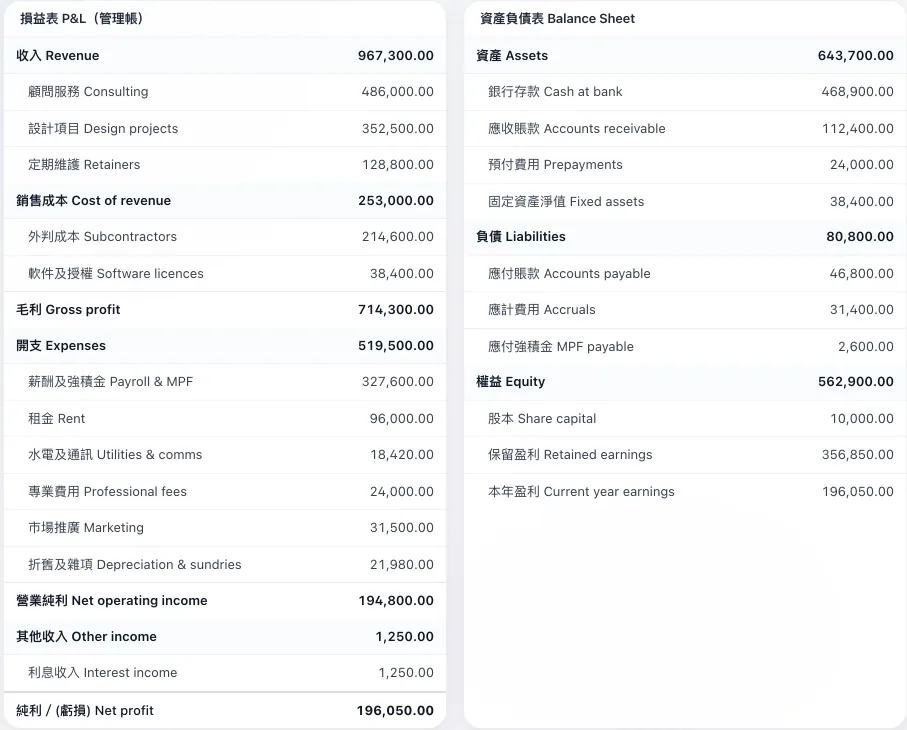
Organise journals and books with double-entry bookkeeping. Export profit and loss, balance sheet, trial balance and receivables ageing reports to Excel.
Related capabilities
Bookkeeping
Double-entry bookkeeping: chart of accounts, journals, general ledger, year-end and period locks.
Accounting reports
Profit and loss, balance sheet, trial balance and receivables ageing, exportable to Excel.
07 Hong Kong payslips
Clear details on each payslip.
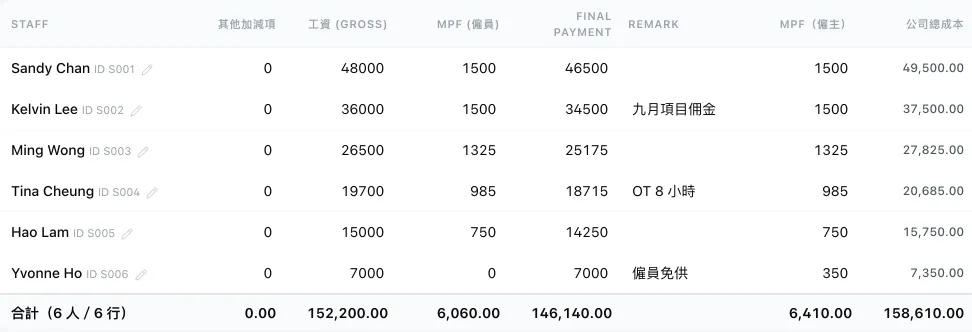
Prepare Hong Kong payslips, calculate MPF contributions and export payslip PDFs for your records.
Related capabilities
Payroll
Hong Kong payroll and MPF calculation, with payslip PDFs.
08 Companies and access
Your companies. Data access by role.
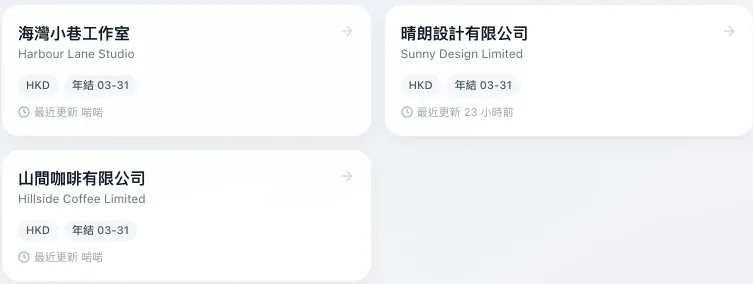
Manage your own companies’ books and invoice formats from one login. Control data access by role, with key changes recorded.
Related capabilities
Multi-company books
Manage the books and invoice formats of several of your companies from one login.
Roles and permissions
Control who can see what by role.
Activity log
Key actions are logged, showing who changed what and when.
Start with how you invoice today.
Tell us how you invoice, keep your books and review reports, then plan deployment around your workflow.